Docker for Devs: From Zero to Container

There's a specific kind of frustration that comes with hearing "but it works on my machine" — either you're saying it or someone is saying it to you. Either way, something is broken in prod and nobody knows why.
Docker is the answer to that. Not just that problem, but a whole class of problems that come from the gap between where you write code and where it actually runs.
What even is a container
Before Docker makes sense, containers need to make sense.
A container is a process running in isolation. It has its own filesystem, its own network interfaces, its own process tree — but it shares the host kernel. That's the key difference from a VM: no hypervisor, no guest OS, no 2-minute boot time. Containers start in milliseconds because they're just processes.
The filesystem a container sees comes from an image — a layered, read-only snapshot of everything the process needs to run. When you run a container from an image, Docker adds a thin writable layer on top. The image itself never changes.
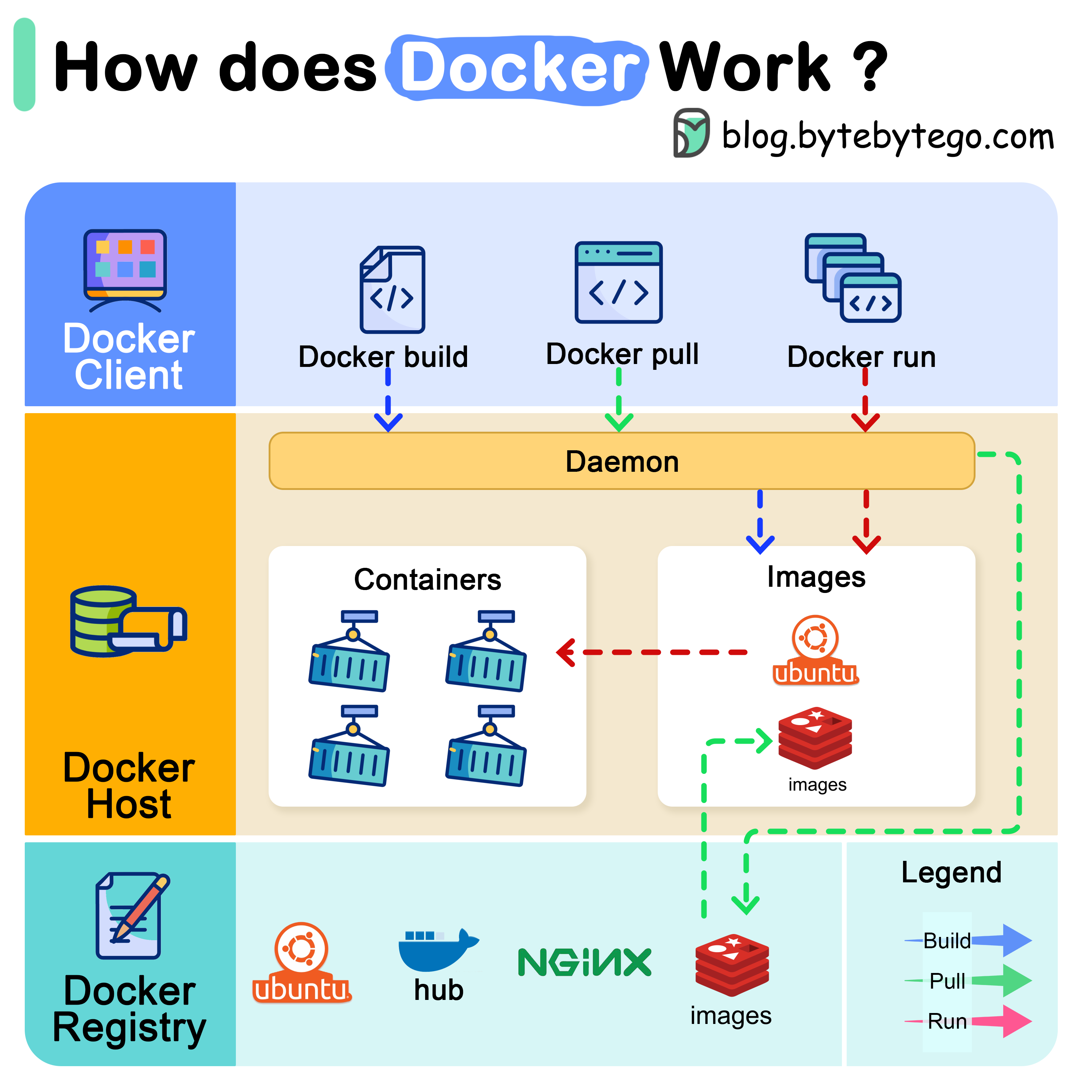
That diagram is worth staring at for a minute. The Docker daemon sits between you and the kernel. The CLI talks to the daemon. Images live in registries. Containers are running instances of images. Once that mental model clicks, everything else follows.
The Dockerfile
Every image starts as a Dockerfile — a plain text recipe.
FROM node:20-alpine

WORKDIR /app

COPY package*.json ./
RUN npm ci --only=production

COPY . .

EXPOSE 3000
CMD ["node", "server.js"]
A few things worth noticing here:
FROM node:20-alpine — Alpine is a minimal Linux distro, around 5MB. The full node:20 image is closer to 350MB. Unless you need glibc-specific binaries, always start with Alpine.
COPY package*.json ./ before COPY . . — this is the most important optimization in any Dockerfile. Docker caches each layer. If your dependencies haven't changed, the RUN npm ci layer hits cache and your build goes from 40 seconds to 3. Copy what changes least, first.
CMD vs RUN — RUN executes during the build and creates a layer. CMD is the default command when the container starts. There's also ENTRYPOINT, which is CMD but harder to override — useful for images that are meant to behave like executables.
Layers and why they matter
Every instruction in a Dockerfile creates a layer. Layers are cached and reused. This is both Docker's biggest performance win and its most common source of bloated images.
The bad way to install dependencies and clean up:
RUN apt-get update
RUN apt-get install -y build-essential
RUN rm -rf /var/lib/apt/lists/*
Three separate layers. The cleanup in the third layer doesn't actually reduce image size because the files still exist in the second layer — they're just hidden. The image carries all three layers.
The right way:
RUN apt-get update && apt-get install -y build-essential \
    && rm -rf /var/lib/apt/lists/*
One layer. The cleanup actually works. This single pattern can cut hundreds of megabytes from an image.
Multi-stage builds
For compiled languages or anything with a build step, multi-stage builds are non-negotiable.
# Stage 1: build
FROM node:20-alpine AS builder
WORKDIR /app
COPY package*.json ./
RUN npm ci
COPY . .
RUN npm run build

# Stage 2: run
FROM node:20-alpine AS runner
WORKDIR /app
COPY --from=builder /app/dist ./dist
COPY --from=builder /app/node_modules ./node_modules
EXPOSE 3000
CMD ["node", "dist/server.js"]
The final image only contains what the second stage puts in it. The build tooling, dev dependencies, source files — none of that makes it into prod. A Next.js app that would be 1.2GB as a single-stage build becomes 180MB with multi-stage.
Volumes and persistence
Containers are ephemeral. When a container stops, its writable layer is gone. This is a feature, not a bug — it's what makes containers reproducible. But it means you need to think deliberately about anything that needs to persist.
Named volumes — managed by Docker, survive container restarts:
docker run -v postgres_data:/var/lib/postgresql/data postgres:16Bind mounts — map a host directory into the container, live-sync during development:
docker run -v $(pwd):/app -p 3000:3000 my-dev-imageBind mounts are the reason hot-reload works in a containerized dev environment. Changes on your host filesystem appear inside the container instantly.
Docker Compose
Once you have more than one service, docker run commands become unwieldy fast. Compose solves this.
services:
  app:
    build: .
    ports:
      - "3000:3000"
    environment:
      - DATABASE_URL=postgres://postgres:password@db:5432/myapp
    depends_on:
      db:
        condition: service_healthy

  db:
    image: postgres:16-alpine
    environment:
      POSTGRES_PASSWORD: password
      POSTGRES_DB: myapp
    volumes:
      - postgres_data:/var/lib/postgresql/data
    healthcheck:
      test: ["CMD-SHELL", "pg_isready -U postgres"]
      interval: 5s
      timeout: 5s
      retries: 5

volumes:
  postgres_data:
depends_on with condition: service_healthy is the part most tutorials skip. Without it, your app container starts before Postgres is ready to accept connections and crashes on the first query. The healthcheck gives Compose a way to know when "started" actually means "ready".
What trips people up
.dockerignore — same idea as .gitignore. Without it, COPY . . sends your entire node_modules, .git, and local .env files into the build context. Add this before your first real build:
node_modules
.git
.env*
*.log
dist
.next
Running as root — containers run as root by default. For anything going to prod, add a non-root user:
RUN addgroup -S appgroup && adduser -S appuser -G appgroup
USER appuser
Port mapping confusion — EXPOSE 3000 in a Dockerfile is documentation. It doesn't actually publish the port. -p 3000:3000 in the docker run command is what opens the port. Host port first, container port second.
Where this fits in a real workflow
Locally, Docker means your dev environment is a docker compose up away on any machine. No "install these 12 things first" onboarding docs.
In CI, Docker means your build environment is the same image every time. No flaky tests caused by a runner having a different Node version.
In prod, Docker is the artifact. You build the image once, push it to a registry, and deploy that exact image everywhere. No surprises.
That's the whole pitch. One format, one artifact, runs anywhere.